21 Connecting a PTZ Camera ( DV800 Series )
You can connect PTZ cameras (not included) to the system. You can use
Lorex
MPX or analog PTZ cameras with the system.
Lorex
MPX PTZ cameras can accept PTZ commands directly through the video cable.
Lorex
MPX PTZ cameras do not require wiring for RS485.
-
Connect the camera video cable to one of the Video IN ports on the system. If you have an MPX PTZ camera, it will automatically be detected and can be controlled by the DVR.
If you have an analog PTZ camera, follow the steps below to set up the camera:
- You can connect the RS485 wires for analog PTZ cameras to the AB ports on the rear panel of the DVR. A is positive (+) and B is negative (-).
- Right-click and click Main Menu. Enter the system user name (default: admin ) and your new, secure password if prompted.
-
Click
![icon]() >Setting>Pan/Tilt/Zoom.
>Setting>Pan/Tilt/Zoom.
![Graphic]()
- Under Channel, select the channel your PTZ camera is connected to.
-
Under Control Mode, select Serial. Configure the following settings for your PTZ camera.
- Protocol: Select the camera’s PTZ protocol (for example, Pelco P).
- Address: Enter your PTZ camera’s address.
- Baud Rate: Enter the baud rate for your PTZ camera.
- Data Bits: Enter your PTZ camera’s data bit setting.
- Stop Bit: Enter your PTZ camera’s stop bit setting.
- Parity: Enter your PTZ camera’s parity setting.
- Click OK. You can now control your PTZ camera using the system.
To connect a PTZ camera to the system:
 >Setting>Pan/Tilt/Zoom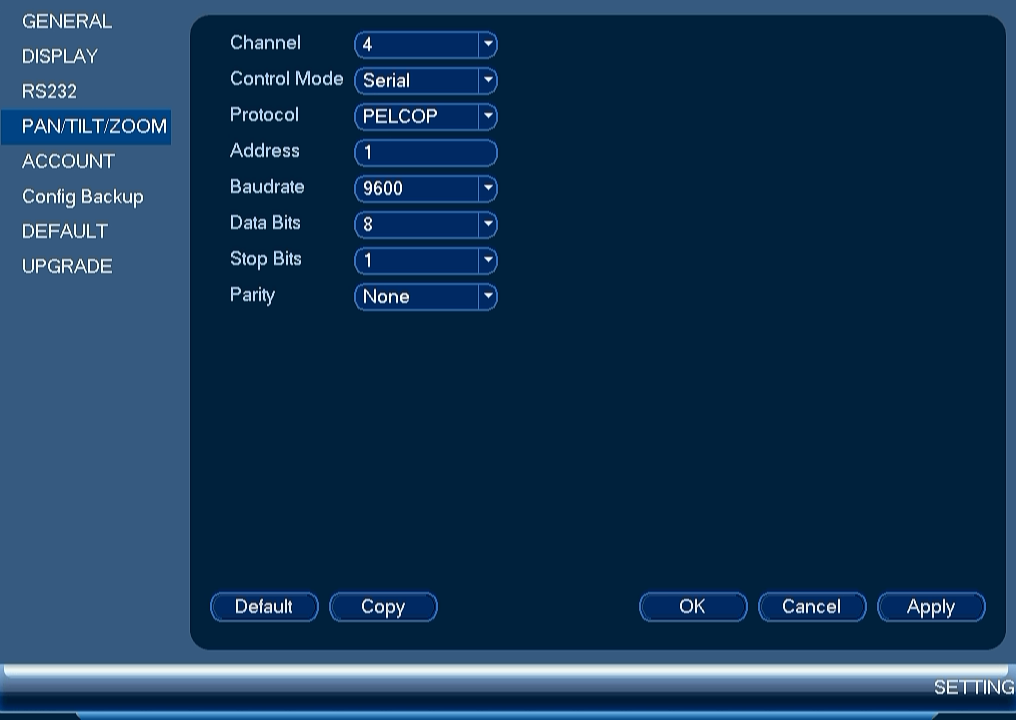

21.1 Controlling a PTZ Camera (Local DVR)
- In Live View, double-click the channel that has the PTZ camera connected to open in full-screen.
- Right-click and click Pan/Tilt/Zoom. Enter the system user name and password if prompted. The PTZ menu opens.
- Use the on-screen PTZ controls to control the camera.
PTZ Controls
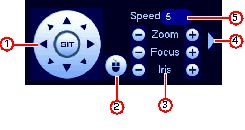
- Direction keys: Click to pan and tilt the camera. Click SIT to stop the current action.
-
Mouse PTZ: Click to activate mouse PTZ mode. In mouse PTZ mode:
- Click and drag to move the camera.
- Use the scroll wheel to zoom in and out.
- Right-click to exit and return to normal PTZ controls.
- Zoom/Focus/Iris: Click +/- to adjust the zoom, focus, and iris.
- Advanced controls: Click to open advanced PTZ controls.
- Speed: Enter the PTZ speed.
21.2 Advanced PTZ Controls
Advanced PTZ controls can be used to save camera positions and cycle through various positions, and automate camera actions.
To open advanced PTZ controls:
-
Click the arrow in the PTZ control window to open advanced controls.
![Graphic]()

Advanced PTZ controls overview:
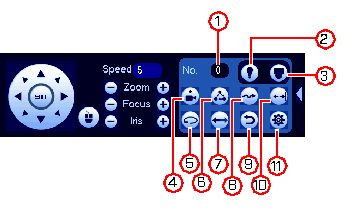
- No.: Select the number of the action you want to perform.
- Not supported.
- PTZ camera menu: Click to open the camera’s OSD menu. This may not be supported on all camera models.
- Preset: Click to call the selected preset.
- Autopan: Click to start autopan. During autopan, the camera will continuously pan 360°.
- Tour: Click to run the selected tour.
- Flip: Click to flip the camera 180°.
- Pattern: Click to run the selected pattern.
- Reset: Click to move the camera to the home position.
- Auto scan: Click to run the selected autoscan.
- Aux: Click to open the aux menu, where you can set up Presets, Tours, Patterns, and Auto Scans.
21.2.1 Presets
Presets will save a camera position for quick retrieval.
To add presets:
-
Click
![icon]() to open the aux menu.
to open the aux menu.
-
Click the Preset tab.
![Graphic]()
- Enter the number of the preset you want to create under Preset.
- Move the camera to the desired position and click Set.
 to open the aux menu.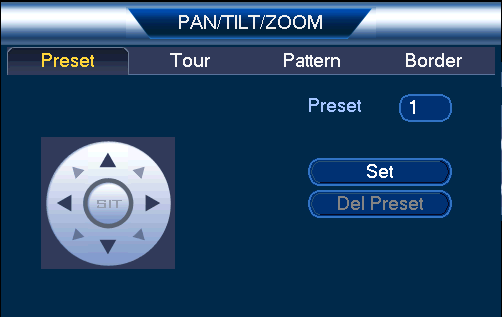
To go to a preset:
-
Under No., select the number of the preset you would like to go to and click
![icon]() .
.
 .
.21.2.2 Tours
Tours will cycle through a set of presets.
To create a tour:
-
Click
![icon]() to open the aux menu.
to open the aux menu.
-
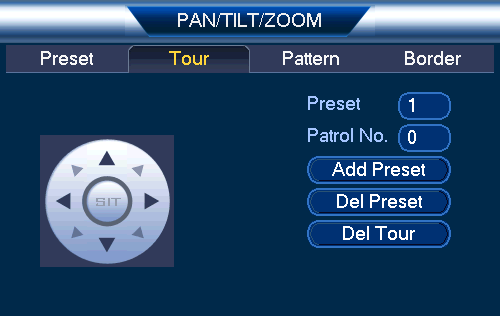
Click the Tour tab.
![Graphic]()
- Under Patrol No., select the tour you would like to configure.
- Under Preset, select a preset you would like to add to the tour.
- Click Add Preset.
- Repeat steps 4 and 5 to add additional presets to the tour.
To run a tour:
-
Under No., select the number of the tour you would like to go to and click
![icon]() .
.
 .
.21.2.3 Pattern
Patterns automatically cycle the camera between two positions.
To create a pattern:
-
Click
![icon]() to open the aux menu.
to open the aux menu.
-
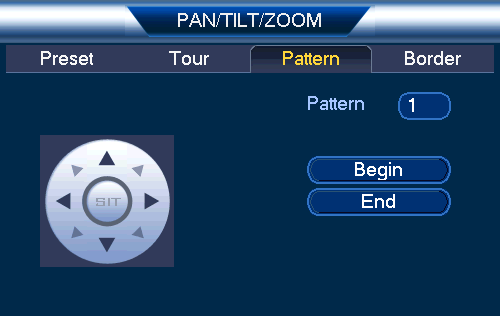
Click the Pattern tab.
![Graphic]()
- Under Pattern, enter the pattern you would like to configure.
- Move the camera into the desired start position and click Begin.
- Move the camera into the desired end position and click End.
To run a pattern:
-
Under No., select the number of the pattern you would like to go to and click
![icon]() .
.
 .
.21.2.4 Auto Scan
An auto scan automatically cycles between a left and right point.
To create a new auto scan:
-
Click
![icon]() to open the aux menu.
to open the aux menu.
-
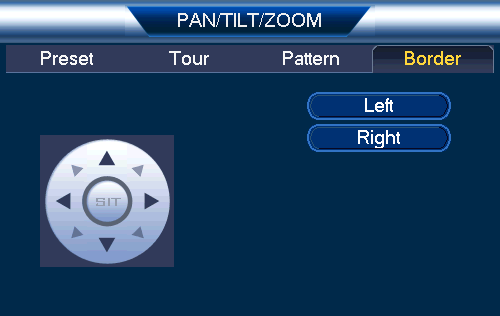
Click the Border tab.
![Graphic]()
- Move the camera into the desired left position and click Left.
- Move the camera into the desired right position and click Right.
To run an auto scan:
-
Click
![icon]() .
.
 .
.